

DIO Product Catalog Surgical Kits New Dr.SOS+ implant maintenance
DIO official specifications
Implant Maintenance: One-kit solution for implant failure cases such as fractured screws, worn connections and trapped debris.
- One-kit solution for implant failure cases: fractured screws, worn connections and trapped debris


Source: DIO Implant official product information. Confirm the platform and size against your fixture before ordering.
DIO Implant · Kit Code DRS 05
New Dr. SOS+ Kit
One Kit Solution for Implant Failure Cases
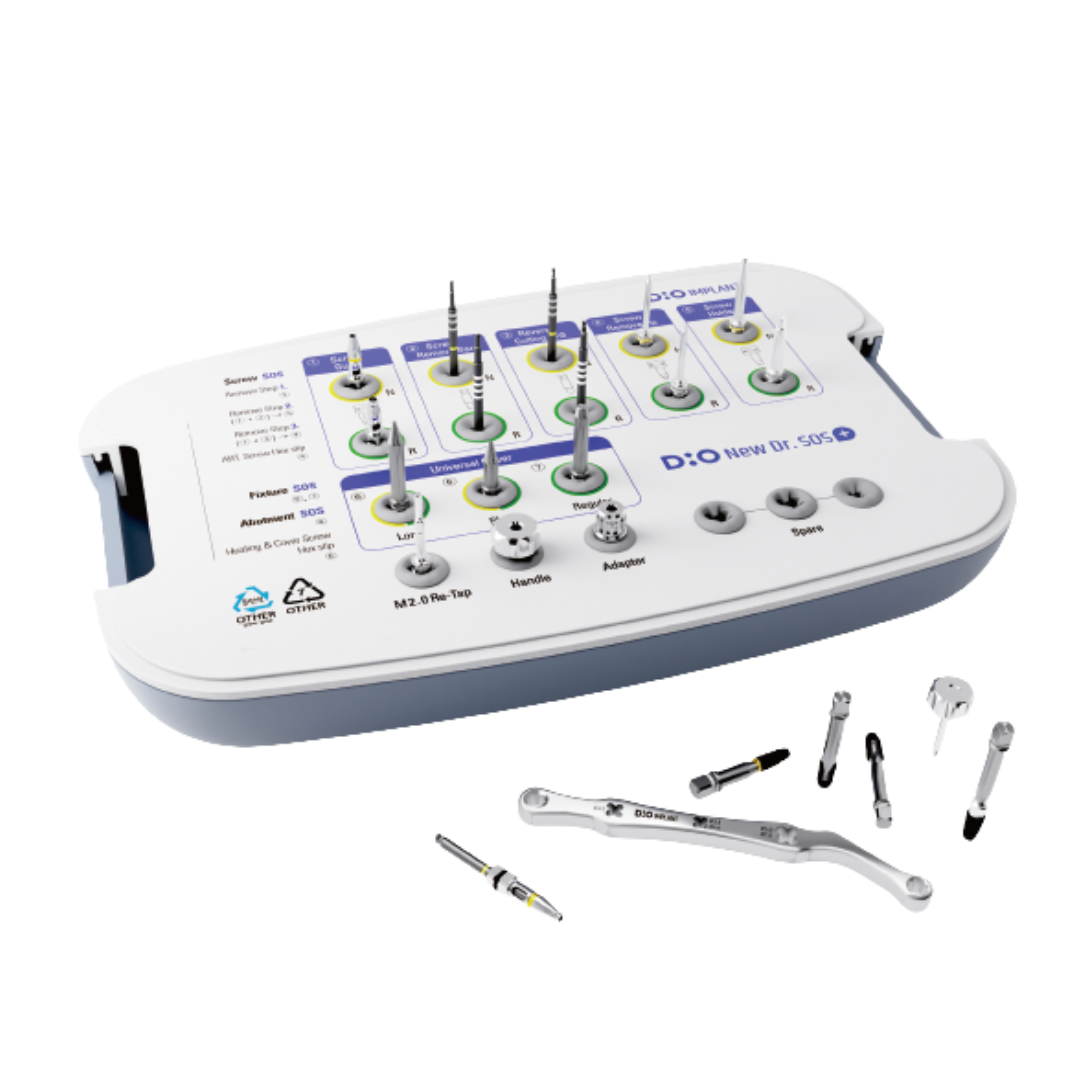

All Case Solution for Implant Failure
Features of New Dr. SOS+ Kit
Solve all cases with one kit
Capable of solving fixture fracture, abutment fracture, screw fracture, damaged hex connections, and internal thread repair cases.
Simple components
Consists of 17 focused tools to solve implant complication cases.
Intuitive fixture removal protocol
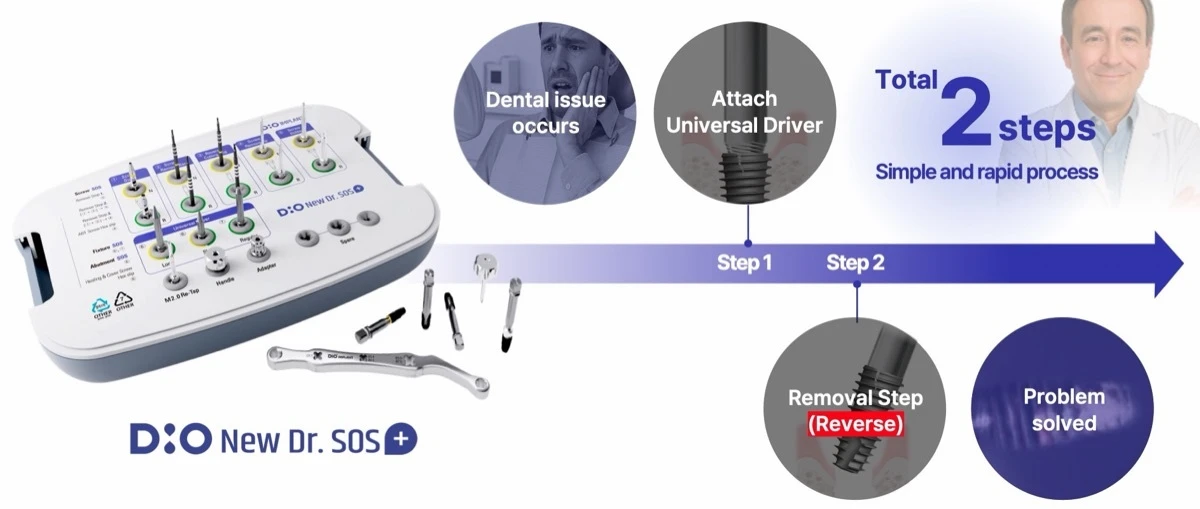
Complete the procedure with controlled reverse rotation after attaching the Universal Driver.
Various screw removal protocols
Multiple workflows support fractured screws, damaged hexes, and challenging retrieval cases.
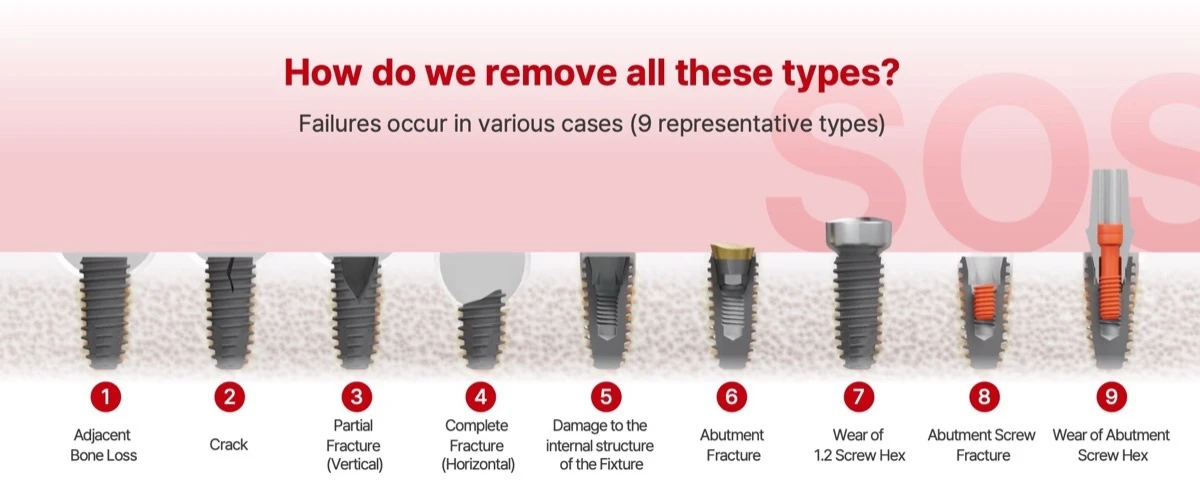
Nine common indications
See the case. Follow the number.
The numbered visual connects each clinical condition to a concise reference list that remains readable on mobile.
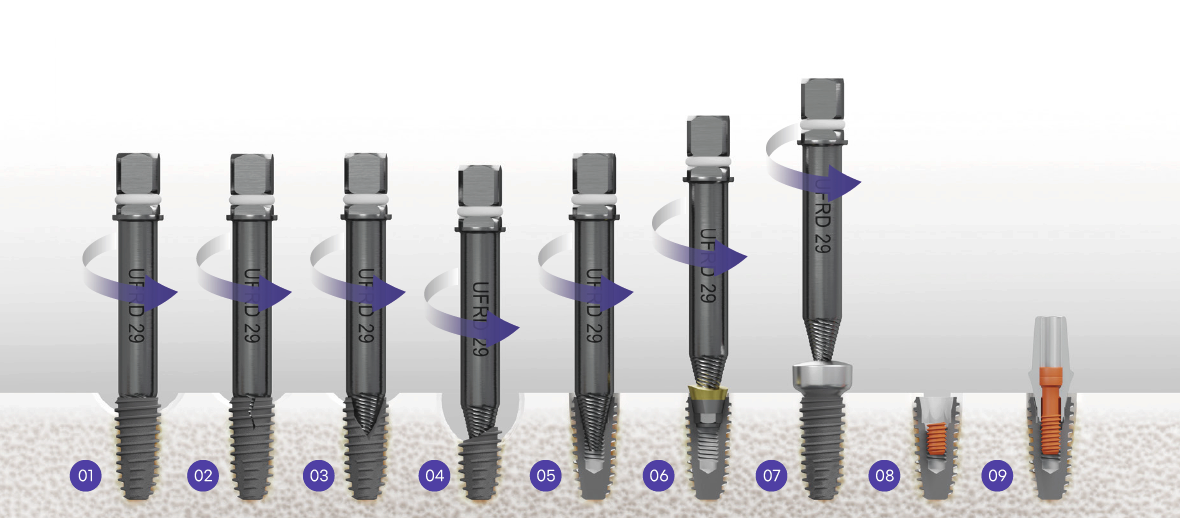
- 01Adjacent Bone Loss
- 02Crack
- 03Partial Fracture (Vertical)
- 04Complete Fracture (Horizontal)
- 05Damage to the Internal Structure of the Fixture
- 06Abutment Fracture
- 07Wear of Healing/Cover Screw Hex
- 08Abutment Screw Fracture
- 09Wear of Abutment Screw Hex
Kit Code · DRS 05
Everything in its place.
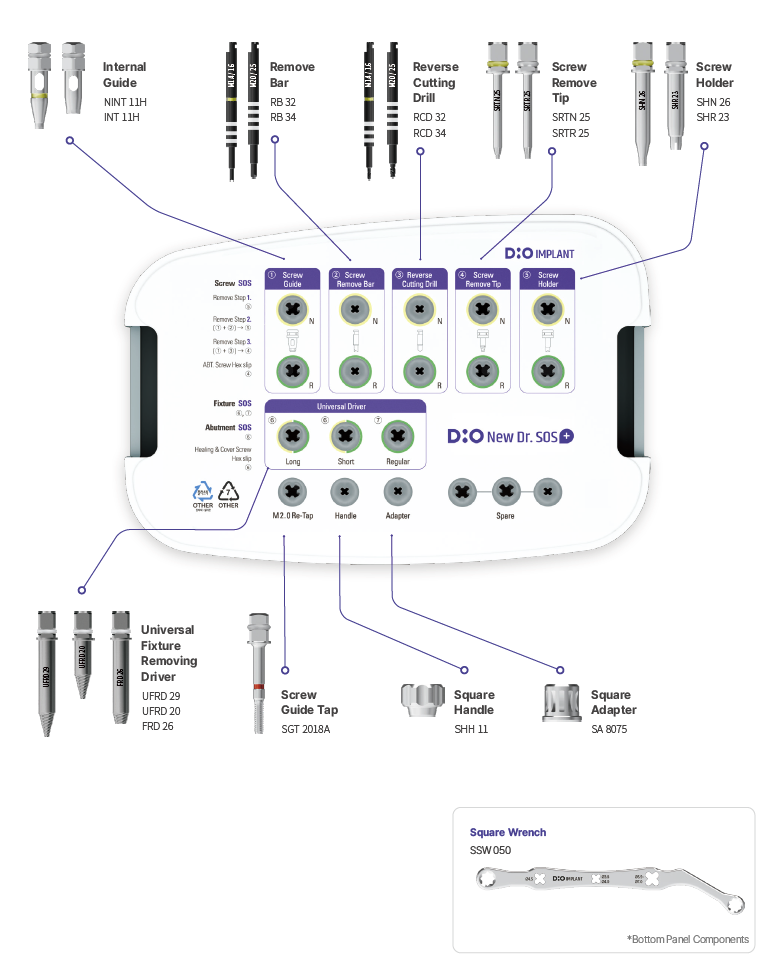
A filed component map keeps identification simple—from guides and removal bars to the Universal Fixture Removing Driver.
Swipe to inspect every component →
Dental implant rescue workflow
File the complication. Open the protocol.
Each protocol is presented as a self-contained clinical file: indication first, visual sequence second, and the key outcome last.
Rescue Implant Fracture
Remove fractured implants, fractured abutments, and healing abutments or cover screws with a damaged hex.
Swipe through the full protocol →

Retrieve a Fractured Abutment Screw
A progressive first-, second-, and third-attempt workflow using the Screw Holder, Remove Bar, Reverse Cutting Drill, and Screw Remove Tip.
Swipe through the full protocol →

Restore Damaged Hex & Threads
Remove damaged abutment screws, restore internal fixture threads, and detach the fixture from the Universal Driver.
Swipe through the full protocol →

Disclaimer: Product color and appearance may vary from the images shown. Such variations do not affect product functionality or performance.
WhiteCap DIO product guide
New Dr.SOS+ Kit
A DIO product for implant complication management and component retrieval. This page helps identify the correct kit or component without changing the manufacturer-defined clinical protocol.
What to confirm before ordering
- Exact item: Match the complication type to the included retrieval, rescue and repair instruments; do not assume every replacement component is included.
- Compatibility: Match the DIO implant family, platform, connection, guide/sleeve system and procedure. Similar-looking components are not automatically interchangeable.
- Package contents: Use the listing image and written component list together. Contact WhiteCap before purchase if a drill, driver, stopper, holder or accessory is not explicitly listed.
- Clinical protocol: Follow current DIO labeling, IFU, drilling sequence, sterilization and reprocessing instructions, and clinician judgment.
DIO describes its surgical-kit range as precision-engineered solutions for guided surgery, freehand implant placement, sinus elevation and implant maintenance. DIONAVI combines digital planning, surgical guides and a structured placement workflow. Product-specific compatibility and included contents control the final purchase decision.
Common ordering questions
Is this kit interchangeable with another DIO kit?
No. Select by the named system and procedure, then verify the included components.
Does the image guarantee every pictured component is included?
No. The written kit contents and selected option govern the order. Ask WhiteCap to confirm any item not explicitly listed.
Where can I verify the manufacturer workflow?
Review DIO surgical kits from DIO Implant USA and the current IFU.
For professional dental use. Product selection and clinical use remain the responsibility of the licensed clinician.
DIO · Implant maintenance
New Dr. SOS+ Kit: one kit for implant emergencies
Remove fractured screws, damaged fixtures and broken abutments with a single kit. Fixtures and abutments come out in 2 steps with the Universal Driver; fractured screws follow a simple 3-attempt sequence.
Why be ready
Screw loosening, screw fractures and fixture fractures recur in everyday practice. Having a removal kit in the clinic means the patient can be treated the same day instead of being referred or rescheduled.
Simple process: 2 steps
No CBCT-based brand identification, no brand-specific tools and no double-locking removers: attach the Universal Driver and reverse.
What’s in the kit
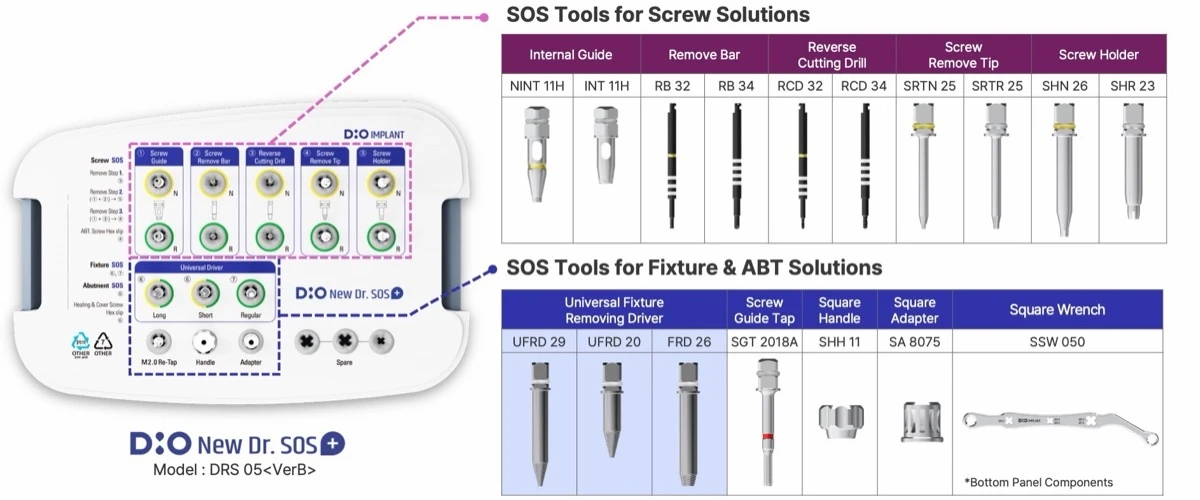
| For | Component | Codes |
|---|---|---|
| Screws | Internal Guide | NINT 11H, INT 11H |
| Screws | Remove Bar | RB 32, RB 34 |
| Screws | Reverse Cutting Drill | RCD 32, RCD 34 |
| Screws | Screw Remove Tip | SRTN 25, SRTR 25 |
| Screws | Screw Holder | SHN 26, SHR 23 |
| Fixture & abutment | Universal Fixture Removing Driver | UFRD 29, UFRD 20, FRD 26 |
| Fixture & abutment | Screw Guide Tap | SGT 2018A |
| Fixture & abutment | Square Handle / Square Adapter | SHH 11 / SA 8075 |
| Fixture & abutment | Square Wrench (bottom panel) | SSW 050 |
Fixture & abutment removal in 2 steps
Attach the Universal Fixture Removing Driver and reverse-rotate. The driver engages any remaining hole, so the implant brand, structure or diameter does not need to be identified first. Re-implantation is possible with the same or a similar diameter.
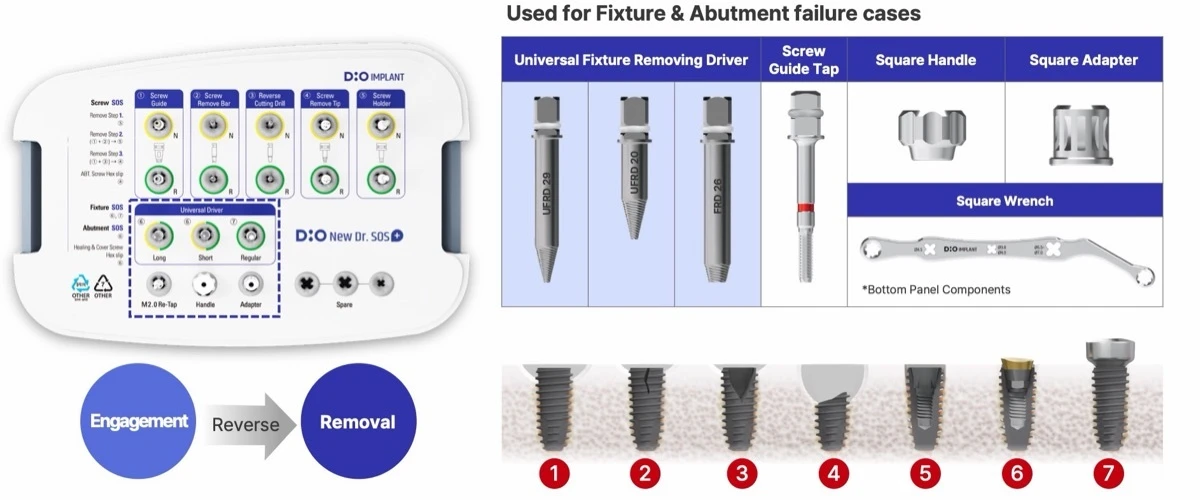
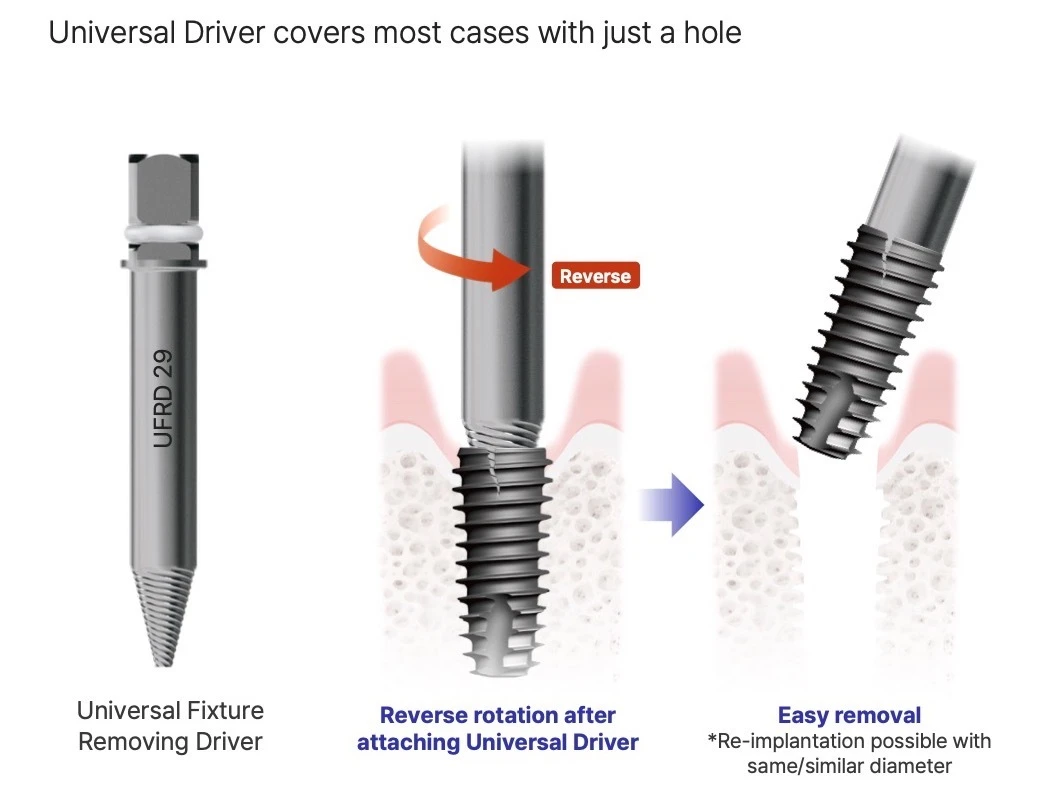
- Covers failure types 1–7: adjacent bone loss, crack, vertical or horizontal fracture, damaged internal structure, abutment fracture, worn 1.2 screw hex
- Universal driver recommended for about 10 uses
- Square Handle, Square Adapter and Square Wrench for torque, Screw Guide Tap (SGT 2018A) to restore threads
Screw removal: 3 attempts in order
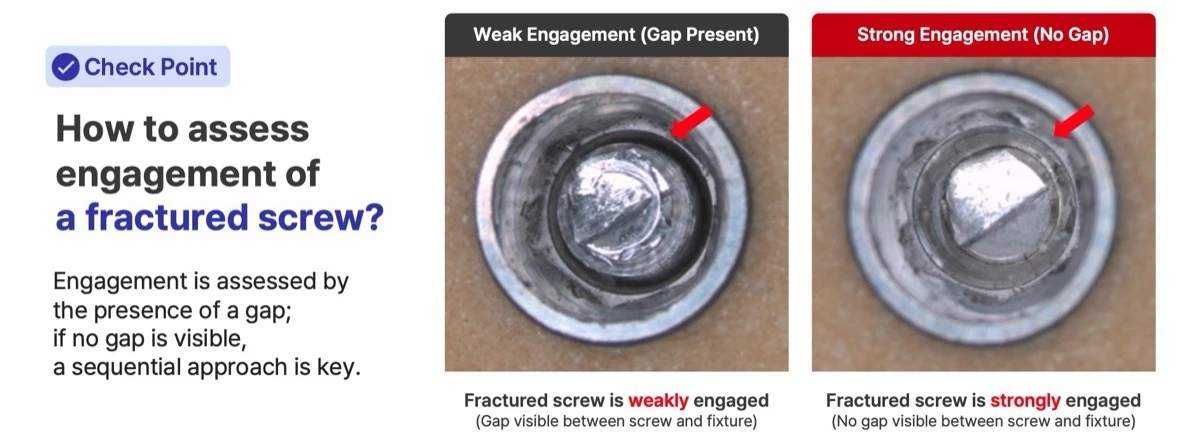
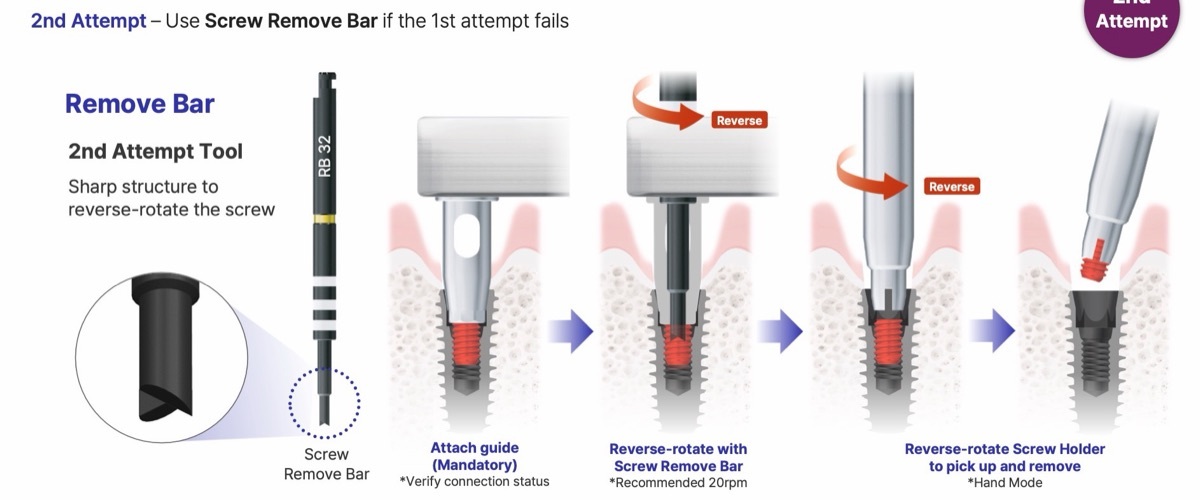
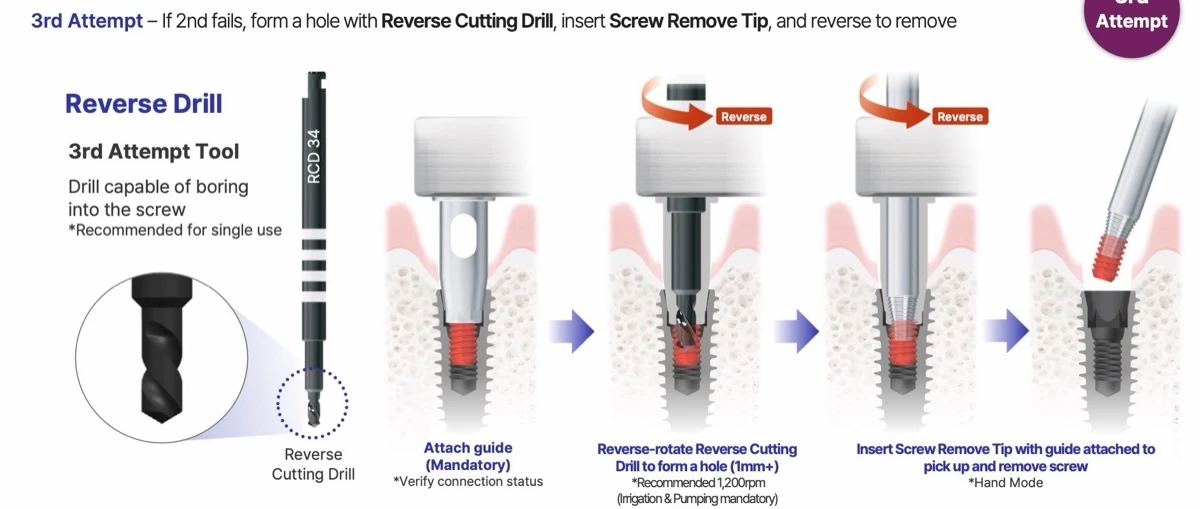
Check engagement first: a visible gap between the fractured screw and the fixture means weak engagement; no gap means strong engagement, so work through the sequence.
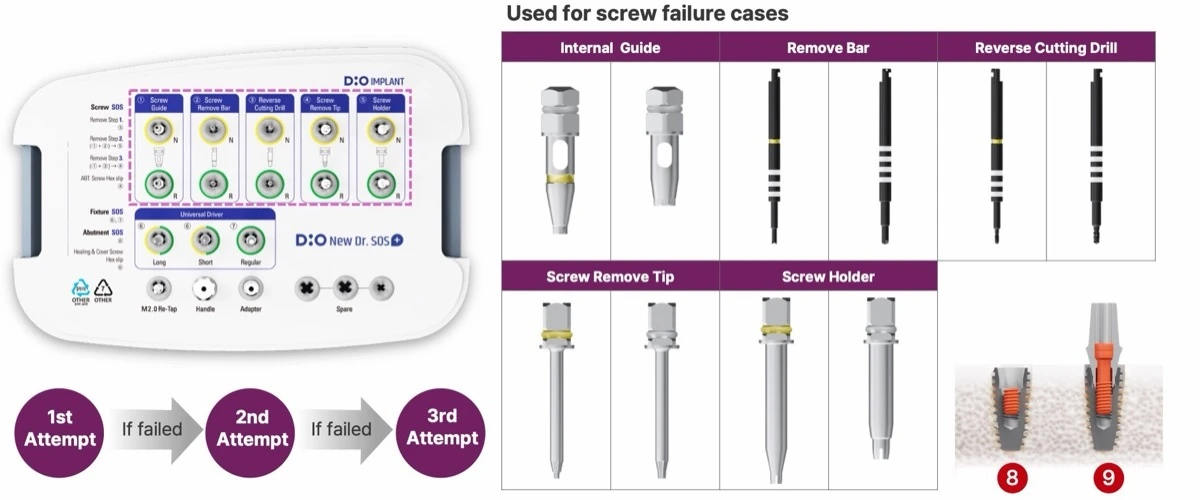
| Attempt | Tool | How | Setting |
|---|---|---|---|
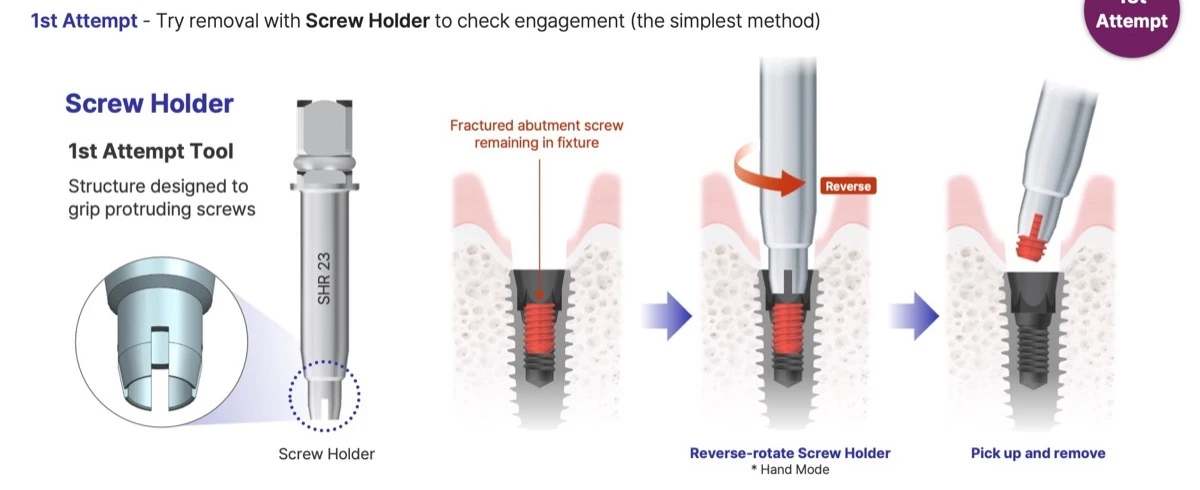
| 1st | Screw Holder (SHN 26 / SHR 23) | Grips the protruding screw; reverse-rotate, pick up and remove | Hand mode |
| 2nd | Remove Bar (RB 32 / RB 34) + Internal Guide | Attach the guide (mandatory, verify connection), reverse-rotate the screw with the sharp bar tip, then pick up with the Screw Holder | About 20 rpm |
| 3rd | Reverse Cutting Drill (RCD 32 / RCD 34) + Screw Remove Tip | With the guide attached, drill a hole of 1 mm or more into the screw in reverse, insert the Screw Remove Tip and remove | 1,200 rpm, irrigation mandatory; drill recommended for single use |
Clinically proven

Replacement tools on WhiteCap
- Universal Fixture Removing Driver (UFRD 29 / FRD 26)
- Internal Guide (NINT / INT)
- Remove Bar (RB 32 / RB 34)
- Reverse Cutting Drill (RCD 32 / RCD 34)
- Screw Remove Tip (SRTN 25 / SRTR 25)
- New Dr. SOS+ Kit (complete kit)
Source: DIO Implant New Dr. SOS+ Kit education material (2026). Follow the instructions for use; clinical results vary with each case.
Frequently asked questions
What problems does the DIO Dr. SOS+ kit solve?
Broken or fractured abutment screws, damaged or stripped screw hexes, abutment fractures and failed implant fixtures, including adjacent bone loss, cracks and fractured fixtures. DIO groups these into 9 representative failure types, all handled with one kit.
Do I need to identify the implant brand first?
No. The Universal Fixture Removing Driver engages any remaining hole in the fixture or abutment, so the brand, structure or diameter does not need to be identified before removal.
What is the broken screw removal sequence?
1st attempt: Screw Holder in hand mode. 2nd attempt: Remove Bar with the Internal Guide attached, about 20 rpm. 3rd attempt: Reverse Cutting Drill with the guide at 1,200 rpm with irrigation to make a hole of 1 mm or more, then the Screw Remove Tip to pick up the screw.
How do I remove a failed implant fixture?
Attach the Universal Driver to the fixture and reverse-rotate. Re-implantation is possible with the same or a similar diameter.
How many times can the tools be used?
The Universal Driver is recommended for about 10 uses. The Reverse Cutting Drill is recommended for single use. Replacement drivers, bars, drills and tips are sold separately on WhiteCap.
What is the success rate?
About 90%, based on 26 clinical cases in DIO education material. Results vary with each case; follow the instructions for use.
Compare DIO surgical kits
Which kit fits your case: placement, guided surgery, implant rescue or crestal sinus lift. See all DIO surgical kits
| Kit | SKU | Best for | Platform / sizes | Guided | Sinus | Rescue |
|---|---|---|---|---|---|---|
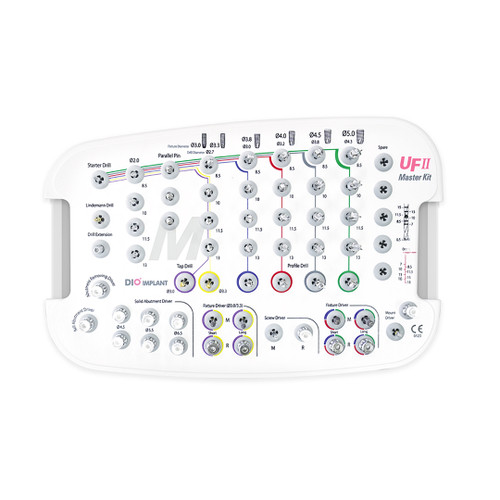
| DIO UFII Master Kit | UF(M) 06 | Conventional implant placement | UFII standard diameters | No | No | No |
| DIO UFII Narrow Kit | UF(M) 08 | Narrow fixtures and ridges | UFII Narrow (Ø3.0–3.3) | No | No | No |
| DIO UF Wide Kit | UF 09 | Wide-diameter fixtures | UFII Wide | No | No | No |
| DIONAVI Master Kit | UF(M) 05 | Guided placement, standard cases | UF(II) Narrow and Regular | Yes | No | No |
| DIONAVI Narrow Kit | UF 14 | Guided narrow cases | Ø3.0–3.3 fixtures | Yes | No | No |
| DIONAVI Wide Kit | UF 11 | Guided wide cases | Ø5.5–6.4 fixtures | Yes | No | No |
| DIONAVI Flapless Crestal Sinus Kit | SMK 02 | Guided crestal sinus lift | Ø3.8–5.0 fixtures | Yes | Yes | No |
| Sinus Drill Solution | SKDS 01 | Free-hand crestal sinus lift (drills) | Stop drills Ø2.8–4.1 | No | Yes | No |
| Sinus Osteotome Solution | SKOS 01 | Free-hand crestal sinus lift (osteotomes) | Wave ST osteotomes Ø2.7–4.0 | No | Yes | No |
| New Dr. SOS+ Kit (this kit) | DRS 05 | Broken screw and failed fixture removal | Universal driver engages any remaining hole | No | No | Yes |